Child Safety Vector Infographic Template Guide
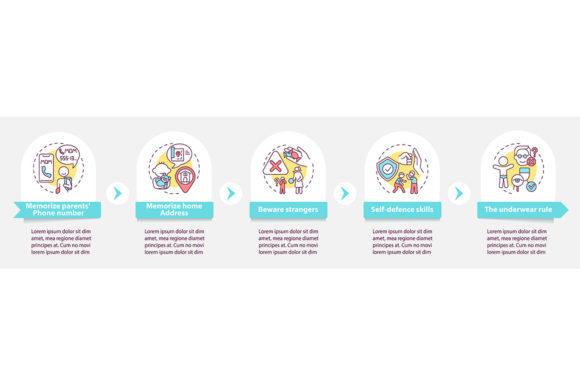
Communicating sensitive topics like personal safety to children requires a delicate balance of clarity and approachability. A Child Safety Vector Infographic Template serves as a vital visual bridge, transforming abstract warnings into concrete, understandable concepts for young minds. When utilizing a design focused on "Beware of Strangers" and parental care, the goal is to educate without inducing fear. This specific template offers a structured five-step process timeline chart that guides viewers through safety protocols logically. Whether you are designing a classroom poster, a community workshop slide deck, or a digital parenting guide, having professional presentation design elements ensures the message is received exactly as intended.
Why Visual Structure Matters in Safety Education
Safety education often fails when it relies solely on verbal instruction or dense text. Children and parents alike respond better to visual workflows that map out decision-making processes. The linear icons included in this vector package provide a universal language that transcends reading levels. For a parent teaching a toddler, these icons act as visual anchors during conversations about safe boundaries. For an educator, they serve as consistent cues that reinforce learning objectives across multiple lessons.
The data visualization aspect of this template is particularly crucial. By breaking down complex safety scenarios into five distinct steps, creators can avoid overwhelming their audience. This workflow layout allows for incremental learning, where each stage builds upon the previous one. Instead of a vague warning to "be careful," the infographic facilitates specific discussions about identifying safe adults, maintaining distance, and seeking help. This structured approach turns anxiety-inducing topics into manageable, actionable knowledge.
Educators and Non-Profit Organizations
For teachers, school counselors, and non-profit advocates, time and consistency are primary concerns. Creating custom safety materials from scratch is resource-intensive and risks inconsistency across different classrooms or programs. This Child Safety Vector Infographic Template provides a standardized framework that maintains educational integrity while allowing for customization. Educators value the EPS and SVG formats because they allow for infinite scaling without quality loss, making the same file suitable for both a handout and a gymnasium banner.
In this context, reliability and pedagogical soundness take precedence over artistic novelty. The pre-designed five-step timeline aligns with common instructional design models, reducing the cognitive load on the teacher. Rather than spending hours arranging shapes and aligning text, educators can focus on tailoring the accompanying script to their specific student demographic. The ability to edit colors and icons means the material can be adapted for different age groups or cultural contexts without compromising the core safety message.
Parents and Community Leaders
Parents and local community organizers often lack professional design training but possess a deep need for high-quality, trustworthy resources. For this group, ease of use and immediate applicability are paramount. They may not know how to manipulate vector anchor points, but they can easily replace text in a JPG or PNG file using basic software. The inclusion of raster formats alongside vectors makes this template accessible to those who simply want to print a clear, professional-looking guide for a neighborhood watch meeting or a family discussion.
The emotional tone of the design matters significantly here. Parents are evaluating whether the imagery feels supportive rather than scary. The linear icons and clean workflow layout project a sense of order and control, which helps alleviate parental anxiety. When a parent uses this template, they are signaling to their child that safety is a predictable, manageable part of life. The commercial value for this audience lies in the peace of mind that comes from using vetted, professionally designed assets rather than amateur clip art that might inadvertently send mixed signals.
Designers and Content Creators
Freelancers, marketers, and bloggers approach this template with a focus on flexibility and efficiency. For professionals creating content for parenting blogs, safety apps, or insurance newsletters, this asset acts as a foundational building block. The ZIP file containing EPS, JPG, PNG, and SVG formats ensures compatibility across various publishing platforms and client requirements. Designers appreciate the organized layer structure typically found in such templates, which speeds up the production workflow significantly.
Creativity within constraints is a key priority for this group. While the template provides the skeleton, designers use it to explore different color palettes, typography pairings, and illustrative styles that match their brand identity. The "Beware Strangers" theme serves as a starting point that can be pivoted toward related topics like internet safety, playground awareness, or emergency preparedness. For content creators, the long-term usefulness of the template is determined by its modularity; can the five-step process be repurposed for other educational sequences? The answer often determines whether the asset becomes a staple in their creative toolkit or a one-time purchase.
Evaluating Technical Formats for Your Needs
Understanding the technical deliverables is essential for maximizing the utility of this Child Safety Vector Infographic Template. Each format serves a distinct purpose depending on your skill level and output requirements.
- EPS (Encapsulated PostScript): Ideal for professional printing and extensive editing. This vector format allows you to resize the infographic to billboard dimensions without pixelation. It is best suited for users with Adobe Illustrator or similar vector software who need to modify the underlying geometry of the icons and timeline.
- SVG (Scalable Vector Graphics): Perfect for web-based presentations and responsive design. SVGs maintain crisp edges on all screen sizes and can be animated with CSS or JavaScript. Educators creating interactive e-learning modules or bloggers embedding graphics directly into articles will find this format most valuable.
- PNG (Portable Network Graphics): Supports transparency, making it excellent for overlaying the infographic onto colored backgrounds or photos. This is the go-to format for social media posts, digital worksheets, and presentations where a white background would look out of place.
- JPG (Joint Photographic Experts Group): Best for quick sharing and standard document embedding. If you need to email a preview to a client or insert the graphic into a Word document for a PTA newsletter, the JPG provides a lightweight, universally compatible option.
Matching the Template to Your Project Goals
Before integrating this template into your work, consider how its specific features align with your objectives. If your primary goal is speed and you lack vector editing skills, verify that the included raster files meet your resolution needs. High-resolution PNGs can often suffice for digital-only projects, eliminating the learning curve associated with vector software. However, if you plan to create a series of safety materials over several years, investing time in mastering the EPS or SVG files yields greater long-term value.
Consider the narrative flow of the five-step process. Does it match the specific safety protocol you intend to teach? Some organizations use a "Stop, Look, Listen, Think, Act" model, while others prefer "Identify, Assess, Decide, Communicate, Report." Because this is a template, the labels are editable, but the linear progression implies a sequential logic. Ensure this matches your educational methodology. If your approach is cyclical rather than linear, you may need to rearrange the layout elements significantly, which requires intermediate design proficiency.
Finally, assess the tone of the existing illustrations. The "Beware Strangers" concept has evolved over the years, with many experts now preferring terms like "Tricky People" or "Safety Awareness" to reduce stigma and increase accuracy. Evaluate whether the current iconography supports modern safety pedagogy. The beauty of a vector template is that you can swap out outdated symbols for more contemporary ones while retaining the effective workflow layout. This adaptability is what transforms a static graphic into a sustainable educational tool that grows with your audience's needs.
Ultimately, the effectiveness of any safety resource depends on how well it resonates with its intended viewers. By understanding the unique priorities of educators, parents, and designers, you can leverage this Child Safety Vector Infographic Template to create materials that are not only visually appealing but genuinely protective. Whether you are producing a quick social media tip or a comprehensive curriculum, the right combination of format, structure, and empathetic design ensures that vital safety information reaches those who need it most.