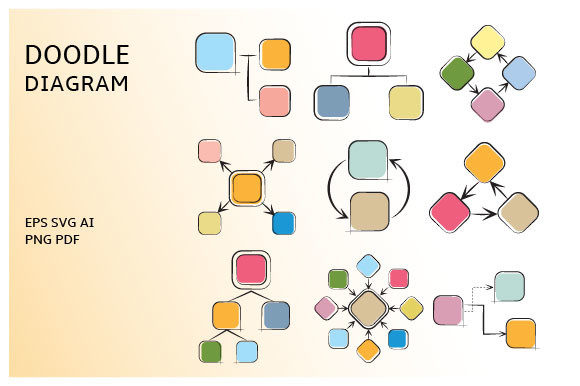
Doodle Diagram Infographic Template Guide
Visual communication often feels like a balancing act between professionalism and approachability. While sleek, corporate graphics have their place, there is a growing demand for design elements that feel more human and organic. This is where a Doodle Diagram Infographic Template becomes an invaluable asset. Rather than presenting information through rigid grids and sterile charts, this style utilizes hand-drawn aesthetics to make complex processes feel accessible and engaging. It bridges the gap between technical data and human understanding, making it easier for audiences to absorb information without feeling overwhelmed by corporate jargon or intimidating visuals.
At its core, this template collection is designed to simplify the creation of process diagrams and visual storytelling assets. It provides a comprehensive library of 100 vector icons that serve as building blocks for your unique narratives. Whether you are mapping out a customer journey, explaining a software workflow, or creating educational materials, these doodle-style elements add a layer of warmth that standard icon sets often lack. The hand-sketched appearance suggests creativity and innovation, signaling to your audience that the content is fresh, thoughtful, and crafted with care rather than generated by an automated system.
Why Hand-Drawn Visuals Improve Engagement
The appeal of doodle-style graphics goes beyond mere aesthetics; it taps into how our brains process visual information. Sketchy, imperfect lines mimic the way we naturally take notes and brainstorm ideas on whiteboards or napkins. This familiarity reduces cognitive load, allowing viewers to focus on the message rather than deciphering overly polished design elements. For educators and trainers, this style can transform dry instructional content into something that feels like a collaborative workshop session. For marketers, it helps brands stand out in crowded digital feeds where minimalist flat design has become ubiquitous.
Furthermore, these templates solve a specific problem for non-designers and busy professionals who need high-quality visuals quickly. Creating custom hand-drawn illustrations from scratch requires significant artistic skill and time. By utilizing a pre-made set of fully editable diagrams, you gain the benefits of bespoke illustration without the associated production costs or learning curve. You maintain creative control while leveraging professional assets that are ready to deploy across various platforms immediately.
Versatile Applications Across Industries
The flexibility of this Doodle Diagram Infographic Template makes it suitable for a remarkably wide range of users. Small business owners can use these icons to create friendly onboarding documents for new employees or clients, setting a welcoming tone from day one. Bloggers and content creators can break up long-form text with engaging process diagrams that illustrate step-by-step tutorials or product reviews. In academic settings, teachers and professors can enhance lecture slides and study guides, making abstract concepts more tangible for students of all ages.
Entrepreneurs and startup founders will find particular value when crafting pitch decks. Investors see hundreds of polished, identical presentations; introducing hand-drawn elements can signal authenticity and a hands-on approach to problem-solving. Similarly, freelancers and consultants can use these assets to visualize their service workflows in proposals, helping potential clients understand exactly what they are buying. Because the icons cover universal concepts like growth, connection, strategy, and execution, they adapt seamlessly to almost any niche or industry vertical.
Technical Flexibility and File Formats
One of the most critical aspects of any digital design asset is its technical versatility. This set ensures you are never limited by file format or resolution constraints. You receive a complete package including AI, EPS, SVG, PDF, and PNG files. This variety is essential because different projects require different specifications. The SVG and EPS formats are vector-based, meaning they are mathematically defined rather than pixel-based. You can scale these icons to the size of a billboard or shrink them down for a mobile app interface without ever losing clarity or sharpness. This scalability is perfect for responsive web design and print materials alike.
For users who may not have access to professional vector software like Adobe Illustrator, the inclusion of high-resolution PNG files with transparent backgrounds is a game-changer. These raster images allow you to drag and drop elements directly into PowerPoint, Keynote, Canva, or Word documents without worrying about white boxes around the icons. Each icon is separated within the zipped file, making organization and retrieval effortless. You do not have to sift through a massive, cluttered artboard to find the single arrow or lightbulb you need; everything is indexed and ready for instant use.
Customization for Unique Brand Identity
While the template provides a consistent stylistic foundation, it is fully editable to match your specific brand guidelines. If you are working in Adobe Illustrator or similar vector software, you can adjust stroke weights, change colors, combine elements, or modify shapes to better align with your visual identity. This level of customization ensures that your infographics do not look generic or stock. You can mix and match the 100 icons to create entirely new metaphors and diagrams that are unique to your project.
Even if you are using the PNG versions, you still retain significant creative freedom. The transparent backgrounds allow for easy layering over colored sections, photographs, or textured patterns. You can apply color overlays in your presentation software or photo editor to tint the icons to your brand palette. This adaptability means the template serves as a starting point for creativity rather than a restrictive cage, empowering users of all skill levels to produce professional-grade visuals.
Important Considerations Before Downloading
Before adding this resource to your toolkit, it is important to understand the nature of the delivery. This is a digital instant download product. No physical item will be sent to you. Upon purchase, you will receive immediate access to the files, allowing you to begin your project without waiting for shipping. This instant gratification is ideal for tight deadlines and last-minute presentation updates. However, it also means you should ensure you have adequate storage space and the necessary software to unzip and open the files before purchasing.
Additionally, consider your current workflow and software capabilities. While the PNG files are universally compatible, unlocking the full potential of the vector files (AI, EPS, SVG) requires appropriate software. If you plan to do extensive editing or recoloring, verify that you have access to a vector graphics editor. If you primarily work in office suites or basic design tools, the high-resolution PNGs will likely meet all your needs. Understanding your own technical environment ensures you select the right assets and avoid frustration later.
Finally, remember that while these doodle elements are powerful, they work best when used intentionally. Avoid overcrowding your designs simply because you have 100 icons available. White space is just as important as the illustrations themselves. Use the diagrams to guide the viewer’s eye and clarify relationships between ideas, not just as decoration. When applied thoughtfully, this Doodle Diagram Infographic Template transforms from a simple collection of icons into a strategic communication tool that enhances clarity, boosts engagement, and adds a distinctive human touch to your digital and print projects.