Disperse Image Effect Photoshop: A Practical Guide
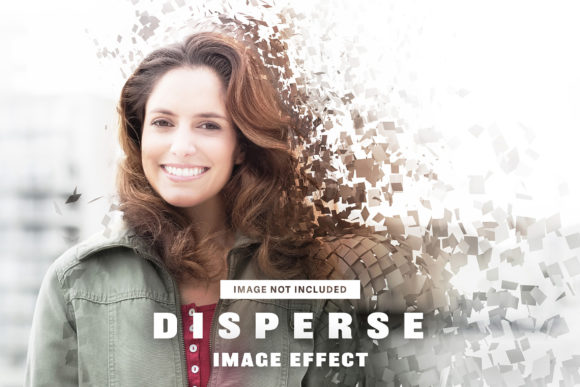
The disperse image effect has become a staple in modern digital design, offering a dynamic way to suggest motion, transformation, or energy within a static composition. At its core, this technique breaks apart the edges of a subject into thousands of tiny particles that seem to dissolve into or emerge from the background. While creating this look manually requires advanced masking and brush work, using a pre-built Disperse Image Effect Photoshop action allows designers to achieve professional results in minutes rather than hours. This specific resource provides a streamlined workflow for Adobe Photoshop CC and higher, making high-end visual manipulation accessible across various skill levels and project types.
Understanding the Technical Foundation
Before applying any effect, it is helpful to understand what makes this file functional and reliable. The included PSD file is engineered at 3600 x 2400 pixels with a resolution of 300 DPI. This specification is significant because it bridges the gap between digital display and print production. Many effects found online are optimized solely for screens at 72 DPI, resulting in pixelation when scaled up for posters or packaging. By maintaining a high-resolution RGB color mode, this template ensures that the particle details remain crisp whether viewed on a smartphone or printed as marketing collateral.
The internal structure features clearly organized and labeled layers. For anyone who has ever opened a complex Photoshop file only to find generic names like "Layer 1 copy," this organization is a major time-saver. The smart object placeholders allow you to replace the default artwork with your own text or imagery non-destructively. It is important to note that placeholder images are not included in the final files; this ensures you have full creative control and avoids licensing complications, allowing the effect to serve as a pure utility for your original content.
Value for Beginners and Hobbyists
For those new to Adobe Photoshop or exploring graphic design as a hobby, the primary barrier to entry is often technical complexity. Creating a realistic dispersion effect manually involves selecting subjects, generating noise patterns, creating custom brushes, and managing layer masks. This process can take days to master and often leads to frustration when results look artificial.
This Disperse Image Effect Photoshop template acts as an educational scaffold. By examining how the layers interact, beginners can reverse-engineer the technique. You can see exactly how opacity, blending modes, and displacement maps combine to create the illusion of depth. Instead of struggling with the mechanics, you can focus on artistic choices like color grading and composition. The ease of customization means a hobbyist can create portfolio-worthy pieces immediately, building confidence while gradually learning the underlying software skills through practical application.
Efficiency for Professionals and Freelancers
Experienced designers and freelancers evaluate tools differently. The priority shifts from learning to efficiency and reliability. When working with tight client deadlines, spending four hours constructing a particle system is rarely billable time. This asset functions as a production accelerator.
Professionals appreciate the 3600 x 2400px canvas size because it accommodates most standard deliverables without requiring upscaling. The labeled layers reduce cognitive load during late-night editing sessions, minimizing the risk of breaking the effect while adjusting client photos. Furthermore, because the file uses smart objects, it integrates seamlessly into existing workflows. A freelance social media manager might use this to batch-create cohesive campaign visuals, ensuring brand consistency across dozens of posts without rebuilding the effect from scratch each time. The commercial value here lies in the hours saved per project, which directly impacts profitability.
Applications for Marketers and Business Owners
Small business owners and marketers often need high-impact visuals but lack dedicated design teams. The disperse effect communicates specific psychological cues: innovation, speed, change, and excitement. These associations make it particularly effective for product launches, tech announcements, or rebranding campaigns.
Unlike subtle filters, dispersion demands attention. For an entrepreneur promoting a new app, this effect visually represents digital transformation. For a fitness coach, it might symbolize burning calories or explosive power. The key advantage of this specific PSD is its flexibility. Because the placeholders accept both text and artwork, a business owner can adapt a single file for multiple purposes. One version might feature a product photo for Instagram, while another uses bold typography for a website hero banner. This versatility maximizes the return on investment for creators who need to stretch limited resources across various platforms.
Educational and Instructional Use Cases
Educators and content creators face unique challenges when visualizing abstract concepts. Static images often fail to convey processes involving movement or decay. The Disperse Image Effect Photoshop tool offers a visual metaphor for these intangible ideas.
A science teacher might use the effect to illustrate sublimation or entropy. A history educator could depict the fading of memory or the dissolution of empires. In corporate training, it can represent data flow or organizational restructuring. Because the effect is customizable, instructors are not locked into stock photography that may not align with their curriculum. They can insert diagrams, historical portraits, or relevant symbols directly into the smart object. The high resolution ensures these materials remain legible when projected in classrooms or embedded in digital textbooks, supporting diverse learning styles through compelling visual storytelling.
Evaluating Fit for Your Specific Needs
Determining whether this asset matches your goals requires honest assessment of your current situation. Consider the following factors before integrating it into your workflow:
- Software Compatibility: Ensure you have access to Adobe Photoshop CC or a higher version. Older CS versions may not support the smart object functionality required for easy customization.
- Output Requirements: If you primarily create web-only assets at small dimensions, the 3600 x 2400px size may be unnecessarily large, potentially slowing down older computers. However, if you anticipate needing print-ready files later, starting at this resolution prevents future quality issues.
- Aesthetic Alignment: Dispersion is a bold, energetic style. It works exceptionally well for sports, technology, music, and fashion. It may feel out of place for conservative industries like law, traditional finance, or luxury minimalism where clean lines and stability are preferred.
- Customization Comfort: While designed for ease of use, you should possess basic Photoshop knowledge. Understanding how to edit smart objects and navigate layer panels is necessary to get the most from this file.
Making the Right Creative Choice
Ultimately, the Disperse Image Effect Photoshop template serves as a bridge between creative vision and technical execution. For beginners, it lowers the barrier to entry and accelerates skill development. For professionals, it eliminates repetitive labor and maintains production standards. For businesses and educators, it provides a versatile visual language that communicates dynamism and change.
The decision to use such a resource should stem from your specific project requirements rather than trend-chasing. When the goal is to convey energy, transformation, or modernity with professional polish and minimal friction, this effect delivers tangible value. By understanding both the technical specifications and the contextual applications across different audiences, you can determine if this tool aligns with your creative objectives and workflow constraints. Whether you are designing a concert poster, teaching physics, or launching a startup, the right effect enhances communication without overshadowing the message itself.