Evaluating the Donation Vector Infographic Template Set for Nonprofit Visual Communication
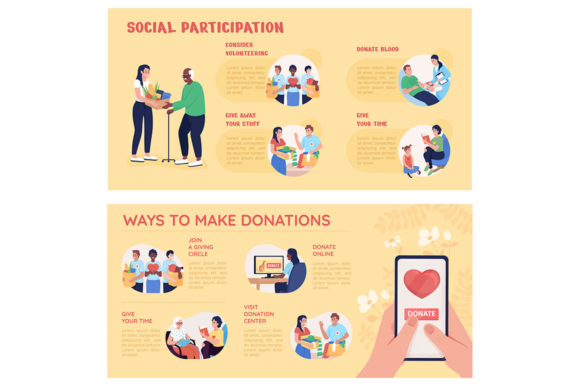
Effective visual communication is often the difference between a fundraising campaign that resonates and one that goes unnoticed. For organizations managing donor relations, volunteer recruitment, or impact reporting, the Donation Vector Infographic Template Set serves as a specialized resource designed to bridge the gap between complex data and emotional storytelling. Unlike generic presentation assets, this specific category of design resources focuses on the unique narrative needs of the charitable sector. It combines functional data visualization with approachable cartoon characters and structured layouts suitable for posters, PowerPoint slides, and social media banners.
When researching design assets, professionals must distinguish between general illustration packs and purpose-built infographic templates. A standard vector character pack may offer diverse poses but lacks the contextual elements necessary for fundraising, such as donation boxes, progress bars, or certificate frames. Conversely, the Donation Vector Infographic Template Set integrates these thematic elements directly into the composition. This integration reduces production time significantly, allowing teams to focus on messaging rather than assembling disparate graphic elements. Understanding the specific utility of this template set requires analyzing its format versatility, stylistic approach, and practical application across different communication channels.
Format Versatility and Technical Compatibility
One of the primary decision factors when selecting digital assets is file compatibility. The Donation Vector Infographic Template Set typically includes a comprehensive suite of formats: JPEG, AI, PNG, EPS, and SVG. Each format serves a distinct purpose in the nonprofit workflow, and understanding these differences is crucial for maximizing the asset's value.
- AI and EPS: These are the source files essential for designers using Adobe Illustrator or compatible vector software. They allow for infinite scaling without quality loss, color adjustments to match brand guidelines, and structural editing of the infographic layout. If your team needs to customize the cartoon characters or alter the data visualization charts, these formats are mandatory.
- SVG: Scalable Vector Graphics are increasingly vital for web-based reporting and interactive annual reports. SVGs maintain crispness on high-resolution displays and can be animated via CSS or JavaScript. For organizations prioritizing digital accessibility and responsive design, SVG support within the template set is a significant advantage over raster-only alternatives.
- PNG: With transparent backgrounds, PNG files are ideal for overlaying elements onto existing presentations or social media graphics. They serve as a middle ground for teams without advanced vector editing capabilities who still need flexible placement options.
- JPEG: While less flexible for editing, pre-rendered JPEGs provide immediate utility for quick updates or internal drafts where high-fidelity printing is not required.
Comparatively, some lower-cost or free alternatives may only offer PNG or JPEG formats. While sufficient for basic social media posts, this limitation becomes a bottleneck when producing print posters or detailed annual reports. Investing in a template set that provides full vector source files ensures longevity and adaptability across multiple campaigns.
Stylistic Considerations: Cartoon Characters vs. Corporate Minimalism
The aesthetic choice between cartoon-style illustrations and corporate minimalism is not merely decorative; it influences donor perception and engagement. The Donation Vector Infographic Template Set generally employs a friendly, illustrative style featuring cartoon characters. This approach is distinct from the sterile, flat-design aesthetics common in corporate finance or tech sectors.
In the context of charity and volunteering, warmth and human connection are paramount. Cartoon characters help soften the presentation of hard data, making statistics about poverty, health, or education feel more personal and less clinical. This style is particularly effective for:
- Volunteer Recruitment: Creating an inviting atmosphere that lowers barriers to entry for new community members.
- Donor Thank-You Materials: Expressing gratitude through expressive, relatable visuals rather than abstract shapes.
- Educational Content: Explaining complex processes like fund allocation or program logistics in an accessible manner.
However, there are tradeoffs. Organizations dealing with highly sensitive or grave subject matter may find cartoon imagery inappropriate. In such cases, a more somber, photographic, or typographic approach might be necessary. Additionally, brands with strict minimalist identity guidelines may need to heavily modify the template set to ensure consistency. When evaluating this resource, assess whether the illustrative tone aligns with your organization’s voice and the specific emotional response you intend to elicit from your audience.
Creative Data Visualization for Impact Reporting
Data visualization in the nonprofit sector faces a unique challenge: it must be accurate enough for stakeholders yet engaging enough for the general public. Standard bar charts and pie graphs often fail to convey the human impact behind the numbers. The Donation Vector Infographic Template Set addresses this by embedding data within thematic metaphors.
Rather than a simple ascending line graph, a template might depict growth through stacking coins, filling hearts, or building structures. This "creative data visualization" transforms abstract metrics into tangible narratives. For example, showing volunteer hours as a collective journey map is often more compelling than a spreadsheet table. When comparing options, look for templates that offer varied chart types specifically adapted for charitable metrics—such as thermometer-style fundraising goals, demographic breakdowns using character avatars, or timeline roadmaps for project milestones. Generic business infographic sets rarely include these niche visualization types, requiring significant custom work to adapt.
Practical Applications Across Media Channels
The true test of any design asset is its cross-platform utility. The Donation Vector Infographic Template Set is engineered for multi-channel deployment, distinguishing it from single-use assets.
Poster Creation: Print materials remain vital for events, community centers, and direct mail. The inclusion of high-resolution vector files allows for large-format printing without pixelation. Templates often include designated text areas and bleed margins, streamlining the pre-press process.
PPT Page Concept Design: Board meetings and stakeholder presentations require clean, readable slides. These templates provide structured layouts that balance visual interest with whitespace, preventing the "wall of text" syndrome common in nonprofit reporting. The cartoon elements add visual anchors that guide the viewer’s eye through the content.
Social Media Banners: Digital advocacy requires rapid content turnover. Ready-made banner templates sized for Facebook, LinkedIn, and Instagram headers allow organizations to maintain visual consistency without hiring a designer for every post. The modular nature of vector files means elements can be rearranged to fit different aspect ratios quickly.
Sourcing and Studio Reliability
Beyond the asset itself, the source matters. Professional studios like NTL studio specialize in vector characters and thematic template sets, offering a level of cohesion that aggregated marketplaces often lack. When searching for trendy backgrounds for animations or consistent character sets across multiple campaigns, relying on a dedicated studio ensures that new assets will match previous ones. This consistency builds brand recognition over time.
In contrast, sourcing individual elements from various creators can lead to a disjointed visual identity where line weights, color palettes, and character proportions clash. While potentially cheaper upfront, the long-term cost of fixing inconsistencies or rebranding materials can outweigh initial savings. Evaluating a studio’s broader catalog alongside the specific Donation Vector Infographic Template Set helps determine if they can serve as a sustainable long-term partner for your visual needs.
Making the Final Selection Decision
Choosing the right Donation Vector Infographic Template Set involves balancing budget, technical capability, and strategic fit. It is the optimal choice for organizations that:
- Need to produce frequent, multi-format content (print, web, presentation) with limited design resources.
- Want to humanize their data through approachable, illustrative storytelling.
- Require editable vector files to maintain brand compliance and scalability.
- Value thematic coherence over generic versatility.
Conversely, this resource may not be suitable if your organization requires photorealistic imagery, adheres to a strictly corporate minimalist aesthetic, or lacks access to vector editing software and has no intention of acquiring it. In those scenarios, photography stock subscriptions or UI-focused design systems might offer better ROI.
Ultimately, the value of this template set lies in its specialization. By providing ready-made, thematically appropriate frameworks for donation and volunteer narratives, it removes the friction from visual creation. This allows nonprofit professionals to spend less time wrestling with design software and more time focusing on the mission-critical work of communicating impact and inspiring action. When evaluated against the specific demands of charitable communication, the specialized template set often proves to be a more efficient and effective tool than general-purpose design alternatives.